Phone Case Canva Mockup: Showcase Your Designs with Ease
A Designer's Tool for Visual Storytelling
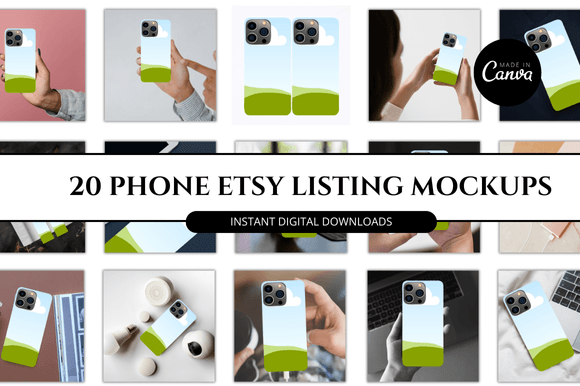
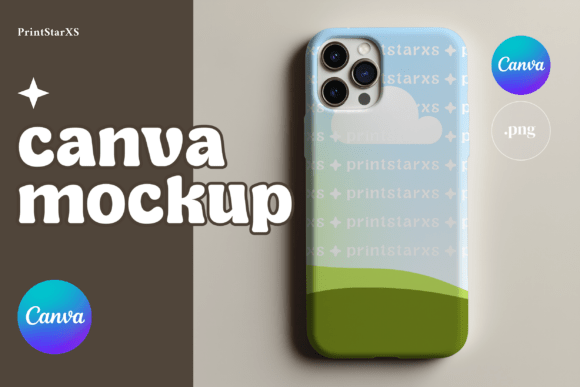
For any designer, entrepreneur, or content creator, presenting a custom design on a tangible product is a critical step. A flat graphic on a screen doesn't always convey the final vision. This is where a high-quality mockup becomes invaluable. The Phone Case Canva Mockup Phonecase PNG is a specific type of design asset built for this purpose. It provides a realistic, three-dimensional representation of a phone case, complete with sleek camera cutouts and a clean, minimalist silhouette. The style is contemporary and professional, avoiding unnecessary visual clutter. Its personality is one of clarity and focus, ensuring your artwork or branding takes center stage. The creamy background option offers a warm, neutral stage that complements a wide range of color palettes, making it a versatile foundation for countless projects.
This isn't just a static image. The true value lies in its dual-format delivery. You receive a high-resolution PNG file with a transparent background, offering maximum flexibility. This file can be dropped into any professional software—Photoshop, Figma, or even free tools like Photopea. More importantly for many, you also get a link to an editable Canva template. This template transforms the mockup into an interactive design asset. Within Canva, you can change the case color with a click and use the intuitive drag-and-drop interface to insert your own patterns or graphics directly onto the phone case surface. This seamless integration with a platform many already use daily removes a significant technical barrier, making professional presentation accessible to everyone from seasoned graphic designers to small business owners managing their own branding.
Practical Applications Across Your Projects
Understanding a tool is one thing; knowing how to apply it effectively is another. The Phone Case Canva Mockup Phonecase PNG excels in scenarios where clear visual communication is key. For a graphic designer building a portfolio, it allows you to show clients exactly how a pattern or illustration would look on a real-world product, moving beyond abstract digital proofs. This builds confidence and can streamline the approval process. If you're an entrepreneur launching a phone case line, this mockup is essential for your product photography and marketing materials. You can generate consistent, professional-looking images for your e-commerce store, social media campaigns, and email newsletters without the cost of a physical photoshoot for every single design variation.
The applications extend far beyond product-based businesses. Marketers and content creators can use it to conceptualize branded merchandise or create engaging social media posts that feature mockups of hypothetical products. Bloggers and publishers in the tech, design, or lifestyle spaces can use it to illustrate articles about phone accessories or custom gifts. For crafters and hobbyists who sell custom designs on platforms like Etsy, it provides a way to create shop listings that stand out with a polished, cohesive look. The minimalist style ensures it adapts to your brand identity, whether you're going for a bold, modern aesthetic or a soft, organic feel. The mockup acts as a neutral canvas, much like a premium font in a logo design, supporting your core message without distracting from it.
Integrating Mockups into Your Design Workflow
Choosing the right design assets is about more than just aesthetics; it's about workflow efficiency and project fit. When evaluating a mockup like this, consider the context of your project. The clean lines and modern typography of the phone case design make it ideal for showcasing contemporary graphic design, but it can also provide an interesting contrast when used with vintage or handwritten script fonts. Think of it as part of your broader design toolkit, alongside your chosen typeface and color palette. Just as you would test a serif font against a sans serif font for readability in a brochure, you should test how your specific artwork interacts with the mockup's camera cutout placement and overall shape.
A practical step is to use the provided Canva template to experiment. Try inserting different textures, patterns, or typographic compositions. Evaluate the visual hierarchy—does your design remain the focal point? Check the consistency of your presentation across multiple mockups if you're creating a series. The high-resolution 2048x2048 pixel quality ensures the final images are sharp for both on-screen use and high-quality printing. Remember, this is a digital file, so the license for commercial use is typically tied to the asset itself. Review the terms to ensure it covers your intended application, whether for client work, your own product line, or promotional materials. By thoughtfully integrating a resource like the Phone Case Canva Mockup Phonecase PNG, you elevate the professionalism of your output, enhance audience engagement through compelling visuals, and build a stronger, more recognizable brand presence.